
Webhooks
What are Webhooks?
Webhooks let you receive automatic notifications when events happen in Contentpen. Instead of checking back to see if your blog post is ready, we'll send a request to your server the moment it's done.
Webhooks can also be a publishing destination: instead of connecting a CMS, you can have Contentpen hand each finished article to your endpoint and publish it yourself. See Using a webhook as a publishing destination.
Supported Events
Event | When it fires |
|---|---|
| Article generation begins |
| Article generation finishes successfully |
| Article generation fails |
| An article is published — to a CMS, via Trigger Webhook in the editor, or handed to your endpoint as an Autopilot publishing destination |
| A publish attempt fails |
| A previously published article is updated via Update Post |
| An article is scheduled for a future publish date |
| A test event you send yourself from the webhook menu |
Pick the events you want per endpoint — you'll only receive the ones you've subscribed to.
How to Setup
1) Create a Webhook Endpoint
First, you'll need a URL on your server that can receive POST requests from Contentpen. This is where we'll send event notifications.
Your endpoint should:
Accept POST requests
Return a 2xx status code within 10 seconds
Use HTTPS (required)
2) Add the Webhook in Contentpen
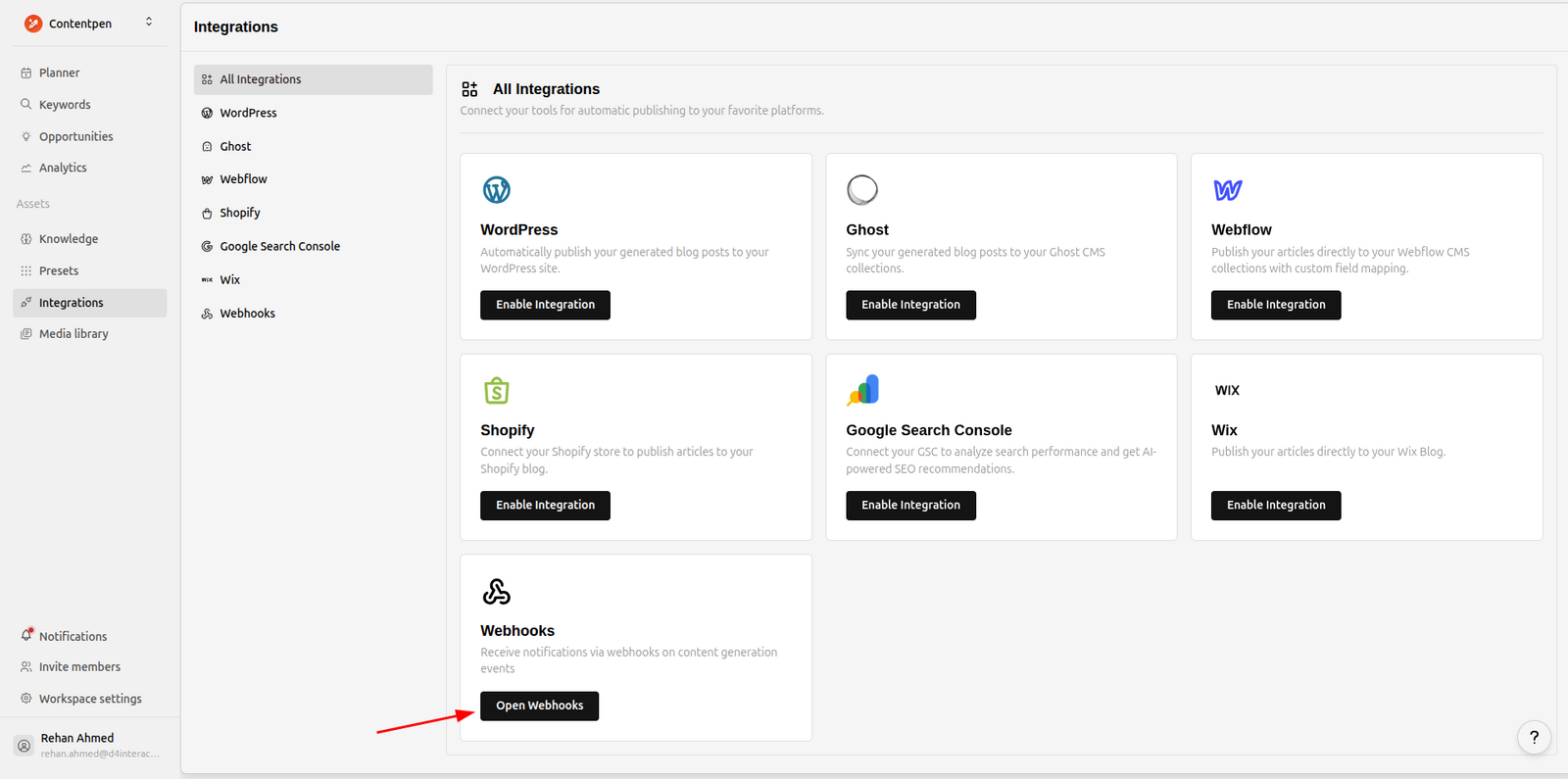
Go to your Integrations page and click on Webhooks.
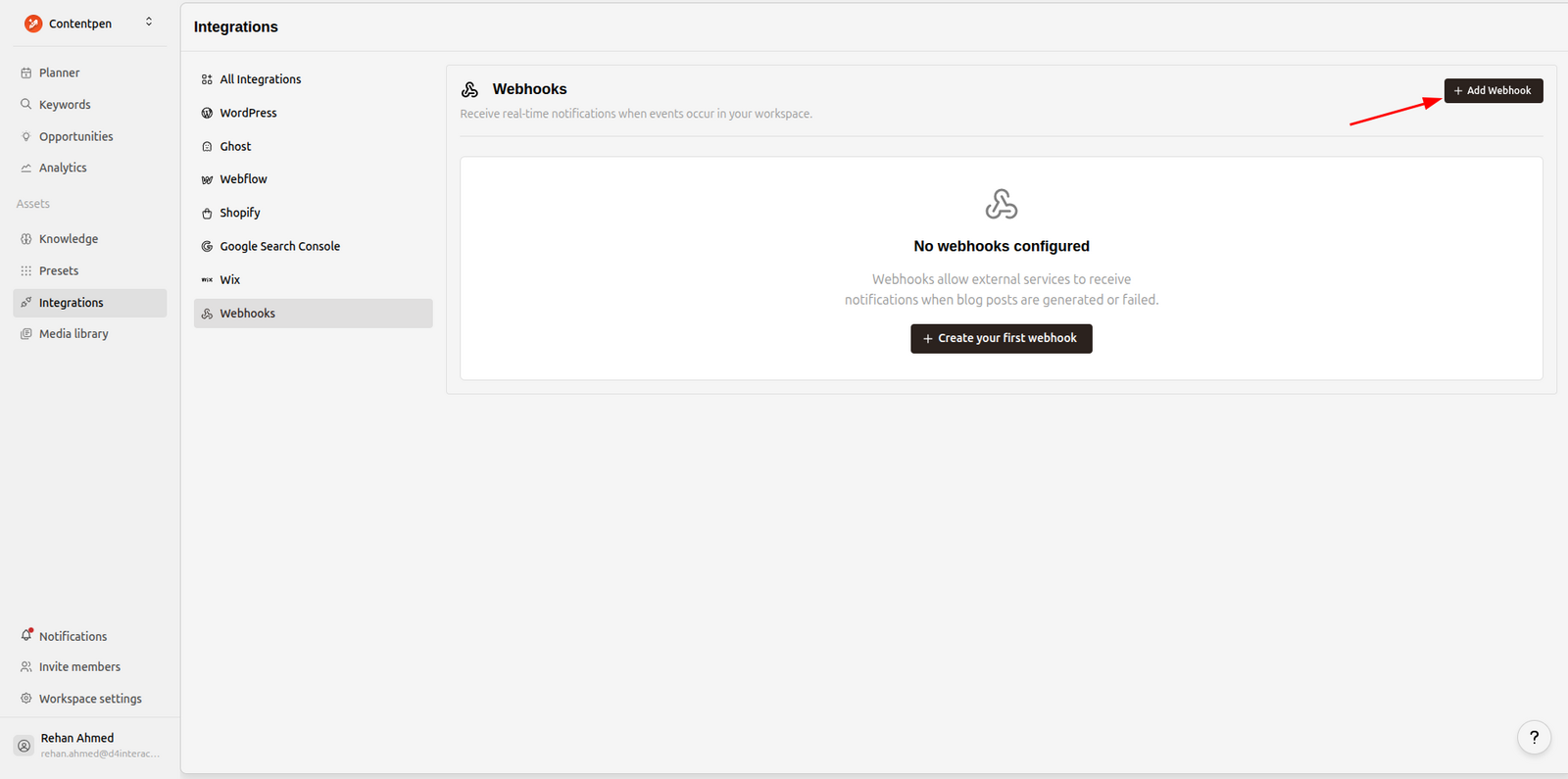
Click Add Webhook to create a new endpoint.
Fill in the details:
Endpoint URL - Your endpoint URL (must be HTTPS)
Description - Optional, helps you identify this webhook later
Events - Select which events should trigger this webhook
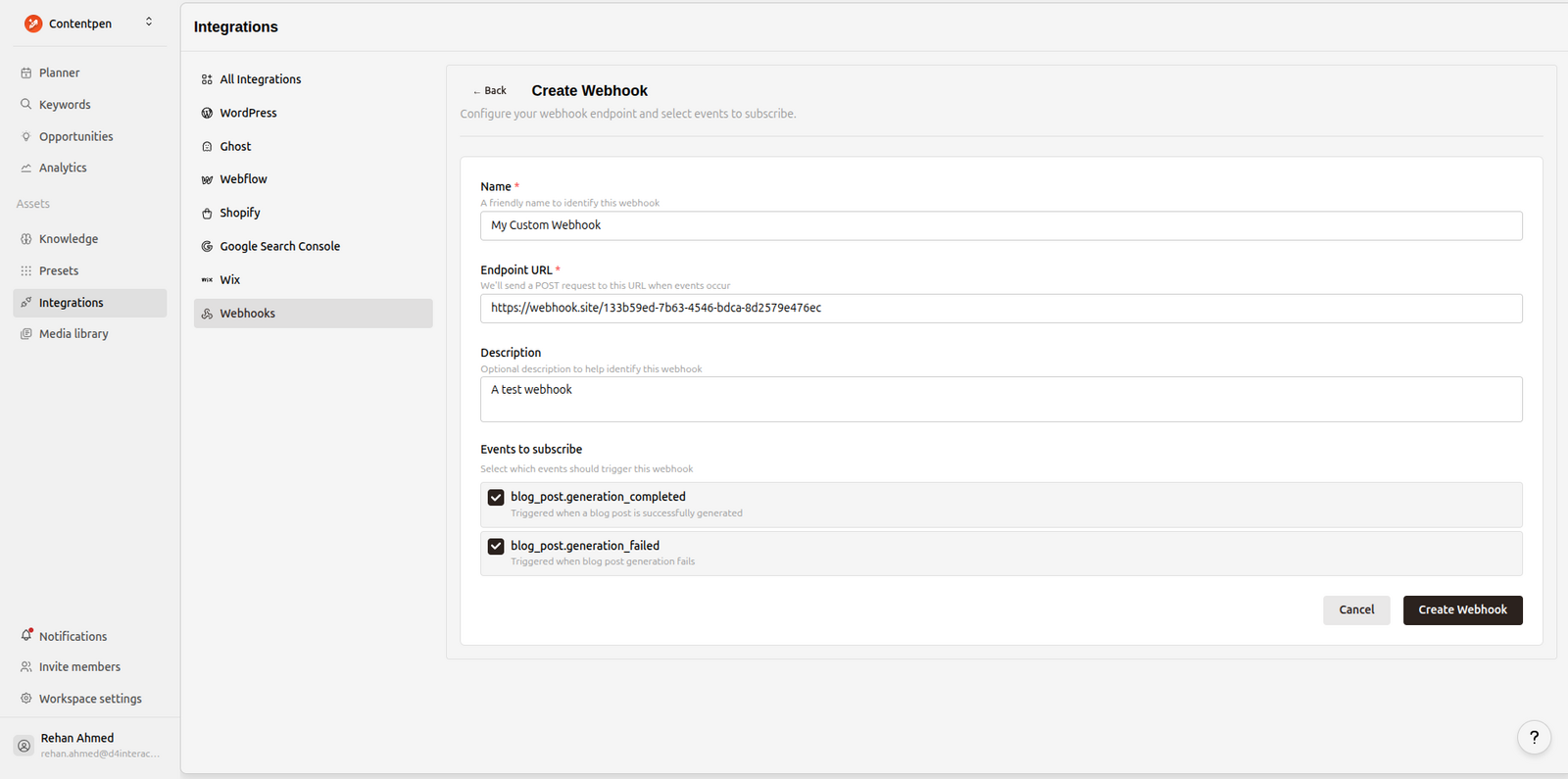
Click Create Webhook and you'll see your signing secret.
⚠️ Important: Copy and save your signing secret now. It will only be shown once. You'll need it to verify webhook signatures.
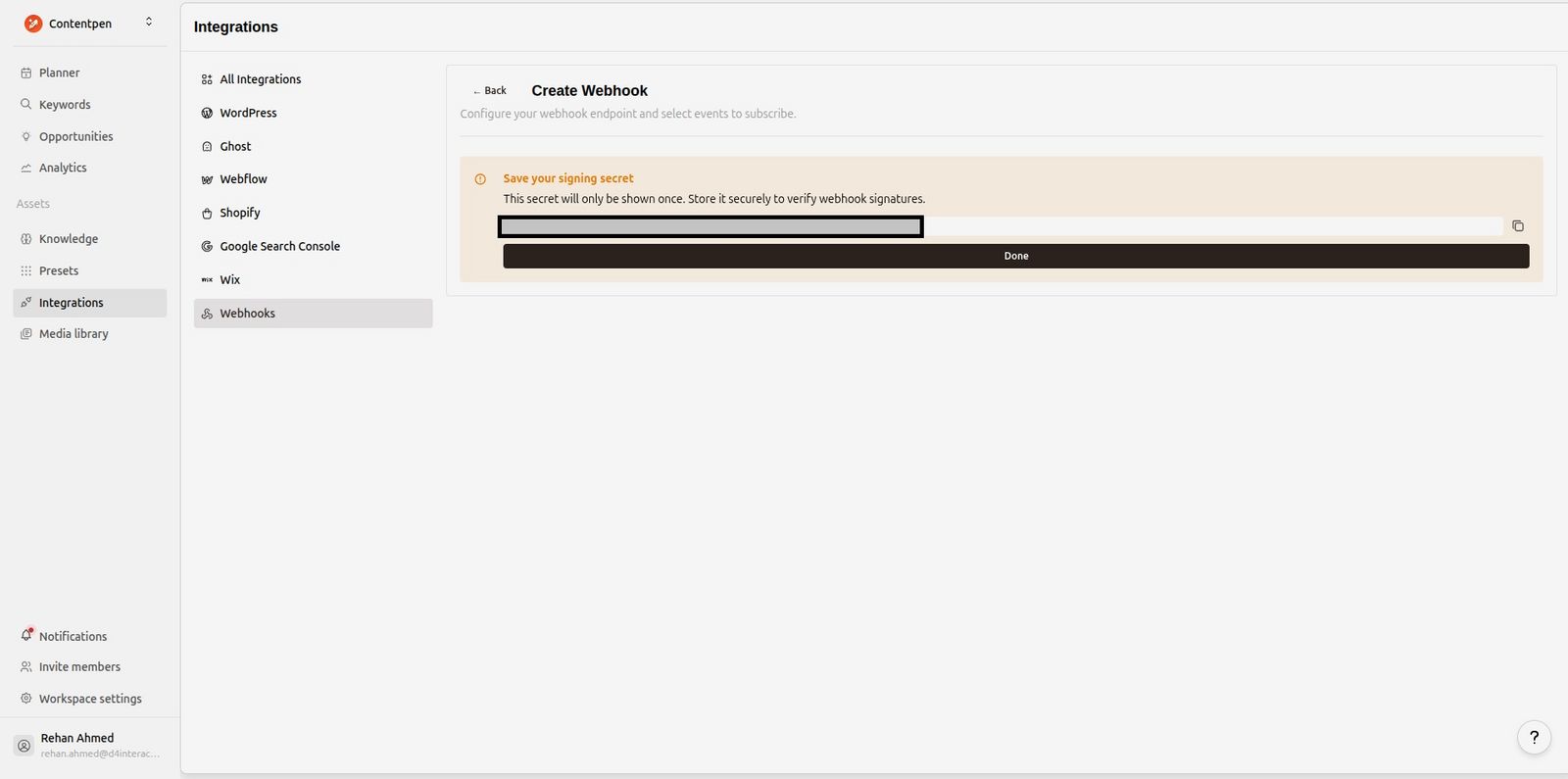
Done! Your webhook is now active and will start receiving events.
Verifying Webhook Signatures
Every webhook request includes a signature so you can verify it actually came from Contentpen. Always verify signatures before processing webhooks.
Signature Header
We send the signature in the X-Contentpen-Signature header:
X-Contentpen-Signature: t=1705315800,v1=5257a869e7ecebeda32affa62cdca3fa51cad7e77a0e56ff536d0ce8e108d8bdt- Unix timestamp when we signed the requestv1- The HMAC SHA-256 signature
Python Verification Example
import hmac
import hashlib
import time

def verify_contentpen_signature(payload: str, signature_header: str, secret: str, tolerance: int = 300) -> bool:
    """
    Verify a Contentpen webhook signature.

    Args:
        payload: Raw request body as string
        signature_header: Value of X-Contentpen-Signature header
        secret: Your webhook signing secret (starts with whsec_)
        tolerance: Max age in seconds (default 5 minutes)

    Returns:
        True if valid, raises ValueError otherwise
    """
    # Parse the signature header
    parts = dict(part.split("=", 1) for part in signature_header.split(","))
    timestamp = int(parts["t"])
    received_sig = parts["v1"]

    # Reject old requests (replay protection)
    if abs(time.time() - timestamp) > tolerance:
        raise ValueError("Timestamp too old")

    # Compute expected signature
    signing_key = secret.replace("whsec_", "")
    expected_sig = hmac.new(
        signing_key.encode(),
        f"{timestamp}.{payload}".encode(),
        hashlib.sha256
    ).hexdigest()

    # Compare signatures (constant-time to prevent timing attacks)
    if not hmac.compare_digest(expected_sig, received_sig):
        raise ValueError("Invalid signature")

    return True
Flask Example
from flask import Flask, request, abort

app = Flask(__name__)
WEBHOOK_SECRET = "whsec_your_secret_here"

@app.route("/webhooks/contentpen", methods=["POST"])
def handle_webhook():
    payload = request.get_data(as_text=True)
    signature = request.headers.get("X-Contentpen-Signature")

    try:
        verify_contentpen_signature(payload, signature, WEBHOOK_SECRET)
    except ValueError as e:
        abort(401, str(e))

    # Process the webhook
    data = request.json
    event = data["meta"]["event_type"]

    if event == "blog_post.generation_completed":
        # Handle successful generation
        blog_post = data["data"]["blog_post"]
        print(f"Blog ready: {blog_post['title']}")

    elif event == "blog_post.generation_failed":
        # Handle failed generation
        error_message = data["data"]["error_message"]
        print(f"Generation failed: {error_message}")

    elif event == "blog_post.published":
        # Two different meanings — see "Using a webhook as a publishing destination"
        payload = data["data"]
        if payload.get("autopilot"):
            # Autopilot is handing you an article to publish. Return 2xx once you
            # have accepted it.
            if payload.get("page_url"):
                # A rewrite of a page you already have live — update it in place,
                # or you end up with two pages competing for the same query.
                update_existing_page(payload["page_url"], payload["blog_post"])
            else:
                create_new_post(payload["blog_post"])
        else:
            # Just a notification that something went live.
            print(f"Published: {payload.get('published_url')}")

    return {"received": True}
Event Payloads
Every event shares the same envelope:
{
  "version": "1",
  "is_test": false,
  "meta": {
    "event_id": "351ea43e-1878-4b08-9118-18235717e699",
    "event_type": "blog_post.generation_completed",
    "event_version": "1.0",
    "timestamp": "2025-12-18T12:50:39.272448Z",
    "workspace_id": "a491fc0c-a961-481d-8939-b2a2e02b175e",
    "organization_id": "fec10d37-8178-41f3-8e83-6aebff170d46",
    "triggered_by": "be3f0498-0381-46fb-8682-52abf1fff9b8"
  },
  "data": { "...event-specific..." }
}version- Envelope version. Bumped only for a breaking change to this structure.is_test-truefor a ping test, so you can route test traffic away from real processing.meta.event_id- Unique per event. UseX-Contentpen-Delivery-Idfor deduplicating deliveries (a retry reuses the delivery id).
The blog_post object comes in two sizes. Events about content include the full article (html_content, markdown_content, meta_title, meta_description, word_count, outline, featured_image_url, featured_image_alt, secondary_keywords); events about status carry a minimal one (id, title, slug, keyword, topic, language, article_size, created_at, updated_at).
A few fields to treat defensively rather than depend on:
languageis the label the article was written with — you'll see both"English"and"en-US"depending on how it was set up. Don't parse it as a locale code.markdown_contentisnullunless the article was actually produced as Markdown.html_contentis the field that's always there.outline,topic,featured_image_url,featured_image_altandsecondary_keywordsare all legitimately empty ornullon plenty of articles.topicmay be an empty string rather thannull.Timestamps in
blog_postare UTC without an offset (2026-09-01T07:15:37.742201); those inmetaandpublished_atcarry aZ.
blog_post.generation_started
Sent when article generation begins. Minimal blog post.
{
  "data": {
    "blog_post": {
      "id": "cea66be7-d8a4-47fa-9f45-3d753020de64",
      "slug": "content-calendar-guide",
      "title": "How to Build a Content Calendar That Actually Ships",
      "topic": "Building a content calendar a small team can keep up with",
      "keyword": "content calendar",
      "language": "en-US",
      "article_size": "small",
      "created_at": "2025-12-18T12:41:17.372587",
      "updated_at": "2025-12-18T12:41:17.372587"
    },
    "generation_type": "one_shot",
    "estimated_duration_seconds": null
  },
  "meta": { "...": "event_type: blog_post.generation_started" }
}
blog_post.generation_completed
Sent when your blog post is successfully generated. Full blog post.
{
  "data": {
    "author": {
      "id": "be3f0498-0381-46fb-8682-52abf1fff9b8",
      "email": "user@example.com",
      "first_name": "John",
      "last_name": "Doe"
    },
    "blog_post": {
      "id": "cea66be7-d8a4-47fa-9f45-3d753020de64",
      "slug": "content-calendar-guide",
      "title": "How to Build a Content Calendar That Actually Ships",
      "topic": "Building a content calendar a small team can keep up with",
      "keyword": "content calendar",
      "outline": "<h1>Blog Outline...</h1>",
      "language": "en-US",
      "created_at": "2025-12-18T12:41:17.372587",
      "updated_at": "2025-12-18T12:50:38.220962",
      "meta_title": "How to Build a Content Calendar That Actually Ships",
      "meta_description": "Plan, write and publish a month of content without the calendar falling apart by week two.",
      "word_count": 2186,
      "article_size": "small",
      "html_content": "<h2>Introduction</h2><p>Your article content...</p>",
      "markdown_content": null,
      "featured_image_url": "https://example.com/image.jpg",
      "featured_image_alt": null,
      "secondary_keywords": null
    },
    "generation_type": "one_shot",
    "duration_seconds": null
  },
  "meta": {
    "event_id": "351ea43e-1878-4b08-9118-18235717e699",
    "event_type": "blog_post.generation_completed",
    "event_version": "1.0",
    "timestamp": "2025-12-18T12:50:39.272448Z",
    "workspace_id": "a491fc0c-a961-481d-8939-b2a2e02b175e",
    "organization_id": "fec10d37-8178-41f3-8e83-6aebff170d46",
    "triggered_by": "be3f0498-0381-46fb-8682-52abf1fff9b8"
  }
}
blog_post.generation_failed
Sent when blog post generation fails. Minimal blog post.
{
  "data": {
    "blog_post": {
      "id": "32390d6a-8a6b-4dcf-a3c0-c3875327901c",
      "slug": "...",
      "title": "...",
      "topic": "Turning one blog post into a month of social posts",
      "keyword": "content repurposing",
      "language": "en-US",
      "created_at": "2025-12-19T04:56:21.396444",
      "updated_at": "2025-12-19T04:56:51.776592",
      "article_size": "medium"
    },
    "error_code": "GENERATION_ERROR",
    "error_message": "SERP analysis failed to return results",
    "generation_type": "one_shot"
  },
  "meta": {
    "event_id": "d925551f-7ff7-4a1f-8ab9-e1e20313848b",
    "timestamp": "2025-12-19T04:56:51.941889Z",
    "event_type": "blog_post.generation_failed",
    "triggered_by": "b8b7b29b-66da-42aa-b8c5-3b0889418a09",
    "workspace_id": "b5c01989-5f4d-4f4a-a029-e8e92ed075d0",
    "event_version": "1.0",
    "organization_id": "699ddf8b-cfd7-4782-8cf7-695d8db1b01c"
  }
}
- error_message is a human-readable sentence written for a person — surface it, don't parse it. The wording can change.
- error_code is a short stable string you can branch on. Two are worth singling out because they're yours to fix: CONTENT_FILTER means the topic was refused and needs rewording, and URL_FETCH_FAILED means the source URL of a content refresh couldn't be read. Everything else — GENERATION_ERROR, RATE_LIMIT, TIMEOUT and the rest — is a transient or upstream problem on our side; retry the article from the app, and talk to us if it keeps happening. Treat unrecognised codes the same way, since new ones may be added over time.
blog_post.published
Sent when an article is published. Full blog post.
This event has two meanings, and the autopilot field tells them apart:
without
autopilot— a notification: the article was published to a CMS, or you fired it manually with Trigger Webhook. Nothing is expected of you.with
autopilot— a request: your endpoint is the destination, and you are being asked to publish this article. See the section below.
{
  "data": {
    "blog_post": { "...full article, as in generation_completed..." },
    "author": {
      "id": "be3f0498-0381-46fb-8682-52abf1fff9b8",
      "email": "user@example.com",
      "first_name": "John",
      "last_name": "Doe"
    },
    "published_url": "https://yourblog.com/content-calendar-guide",
    "cms_platform": "wordpress",
    "categories": ["Content Marketing"],
    "tags": ["content calendar", "editorial planning"],
    "published_at": "2025-12-20T09:00:02.113402Z",
    "page_url": null,
    "autopilot": null
  },
  "meta": { "...": "event_type: blog_post.published" }
}cms_platform-wordpress,ghost,webflow,shopify,wix,emdash, orwebhookwhen your endpoint is the destination.nullwhen fired manually.published_url-nullwhen we don't know it yet, which includes every webhook-destination delivery: your system is the one about to create the URL.page_url- the live URL this article was rewritten from, when it was rewritten from one. Set for any refreshed article — whether the refresh came from Autopilot or from the editor's own refresh flow — andnullfor a brand-new article. See Create or update?
blog_post.publish_failed
Sent when a publish attempt fails. Minimal blog post.
{
  "data": {
    "blog_post": { "...minimal article..." },
    "cms_platform": "wordpress",
    "error_code": "PUBLISH_ERROR",
    "error_message": "401 Unauthorized: application password rejected"
  },
  "meta": { "...": "event_type: blog_post.publish_failed" }
}
error_code is always PUBLISH_ERROR here — the CMS-specific detail is in error_message (usually the status code and body the CMS returned).
blog_post.updated
Sent when a previously published article is re-pushed with Update Post. Full blog post.
{
  "data": {
    "blog_post": { "...full article..." },
    "updated_by": {
      "id": "be3f0498-0381-46fb-8682-52abf1fff9b8",
      "email": "user@example.com",
      "first_name": "John",
      "last_name": "Doe"
    },
    "updated_fields": ["content"],
    "page_url": "https://yourblog.com/on-page-seo-checklist"
  },
  "meta": { "...": "event_type: blog_post.updated" }
}
page_url is set here whenever the article was a refresh of a live page — which is the common case for this event, since Update Post is how a refreshed article reaches a CMS that already holds the original.
blog_post.scheduled
Sent when an article is scheduled for a future publish date. Minimal blog post.
{
  "data": {
    "blog_post": { "...minimal article..." },
    "author": {
      "id": "be3f0498-0381-46fb-8682-52abf1fff9b8",
      "email": "user@example.com",
      "first_name": "John",
      "last_name": "Doe"
    },
    "scheduled_at": "2025-12-24T00:00:00Z"
  },
  "meta": { "...": "event_type: blog_post.scheduled" }
}
Using a Webhook as a Publishing Destination
Autopilot normally publishes to a connected CMS. If your site isn't one we integrate with — a headless site, a static build, your own editorial queue — you can point Autopilot at a webhook endpoint instead, and publish the article yourself.
How it differs from every other event: this delivery is the publish. We are not telling you something happened; we are handing you an article and asking you to put it live. Your HTTP response decides what Contentpen records.
Setting it up
Create a webhook endpoint as above, and make sure Blog Post Published is one of its selected events. An endpoint without it still appears in the destination list, greyed out and labelled Unavailable — hover it to see what's missing — but it can't be chosen until you add the event.
Open Autopilot → Settings → Where it publishes, and pick your webhook from the list. Your webhooks appear under a Webhooks heading, alongside your connected sites.
That's it. Autopilot writes on its normal cadence, and on each article's publish date we POST it to your endpoint.
⚠️ Keep the event subscribed. The Webhooks page doesn't know it's being used as a destination, so if you later uncheck Blog Post Published on that endpoint, publishing stops working — you'll see the article marked as a failed publish, with the reason. Re-check the event to fix it.
What you receive
A normal blog_post.published event with the full article, cms_platform: "webhook", and an autopilot block:
{
  "version": "1",
  "is_test": false,
  "meta": {
    "event_id": "9f2b1c44-6d0e-4a63-9a0e-2c9f1b7d5a31",
    "event_type": "blog_post.published",
    "event_version": "1.0",
    "timestamp": "2026-09-04T00:00:07.482913Z",
    "workspace_id": "a491fc0c-a961-481d-8939-b2a2e02b175e",
    "organization_id": "fec10d37-8178-41f3-8e83-6aebff170d46",
    "triggered_by": "be3f0498-0381-46fb-8682-52abf1fff9b8"
  },
  "data": {
    "blog_post": {
      "id": "cea66be7-d8a4-47fa-9f45-3d753020de64",
      "slug": "content-calendar-guide",
      "title": "How to Build a Content Calendar That Actually Ships",
      "topic": "Building a content calendar a small team can keep up with",
      "keyword": "content calendar",
      "language": "en-US",
      "article_size": "small",
      "created_at": "2026-09-02T12:41:17.372587",
      "updated_at": "2026-09-03T12:50:38.220962",
      "meta_title": "How to Build a Content Calendar That Actually Ships",
      "meta_description": "Plan, write and publish a month of content without the calendar falling apart by week two.",
      "word_count": 2186,
      "outline": "<h1>Blog Outline...</h1>",
      "html_content": "<h2>Introduction</h2><p>Your article content...</p>",
      "markdown_content": null,
      "featured_image_url": "https://example.com/image.jpg",
      "featured_image_alt": null,
      "secondary_keywords": null
    },
    "author": {
      "id": "be3f0498-0381-46fb-8682-52abf1fff9b8",
      "email": "user@example.com",
      "first_name": "John",
      "last_name": "Doe"
    },
    "published_url": null,
    "cms_platform": "webhook",
    "categories": null,
    "tags": null,
    "published_at": "2026-09-04T00:00:07.482913Z",
    "page_url": null,
    "autopilot": {
      "campaign_id": "7d1c2f90-4b3a-4c8e-9f21-8a6b0d4e5c77",
      "queue_item_id": "b2a5e6d1-3c47-4f8b-9d20-1e7c5a9f4b60",
      "source": "competitor_gap",
      "action": "generate",
      "scheduled_for": "2026-09-04T00:00:00Z",
      "delivery_is_the_publish": true
    }
  }
}
Field | Meaning |
|---|---|
| The Autopilot setup that produced this article |
| The Autopilot topic it was written for |
| Why Autopilot picked the topic, e.g. |
|
|
| The date this article was scheduled to go live |
| Always |
Create or update? Read page_url
page_url sits on data, beside published_url — not inside autopilot — because a refresh isn't an Autopilot-only idea. Refresh an article yourself from the editor and publish it, and the same field tells you the same thing.
Autopilot does two different jobs, and roughly half of what it sends you is the second one:
page_urlisnull→ a brand-new article. Create a post.page_urlis set → this article is a rewritten version of the page already live at that URL, because Autopilot found it was underperforming. Update that page in place. Creating a new post instead leaves two pages competing for the same query — the exact problem the rewrite was meant to fix.
{
  "data": {
    "blog_post": {
      "slug": "on-page-seo-checklist",
      "title": "On-Page SEO Checklist: 12 Checks That Still Matter in 2026",
      "html_content": "<p>…the rewritten article…</p>"
    },
    "cms_platform": "webhook",
    "page_url": "https://yourblog.com/on-page-seo-checklist",
    "autopilot": {
      "action": "refresh",
      "source": "striking_distance",
      "scheduled_for": "2026-09-07T00:00:00Z",
      "delivery_is_the_publish": true
    }
  }
}
blog_post.slug is usually the existing page's slug too, but match on page_url — it's the field that is guaranteed to identify the page, and a slug can be rewritten.
How to respond
Return 2xx once you've accepted the article — after you've queued it, at minimum. Contentpen marks the article Published and frees the Autopilot slot.
Return anything else, or time out, and we retry: 5 attempts in total, backing off roughly 1m → 5m → 15m → 1h. If all five fail, the article is marked Publish failed with the response we got, you're emailed that a scheduled article missed its slot, and after three consecutive failures Autopilot pauses publishing rather than keep failing.
💡 Respond fast, work later. Queue the article and return 2xx within 10 seconds. Rebuilding a static site inside the request is how you end up with a timeout on an article you actually published — and a retry that publishes it twice.
Use X-Contentpen-Delivery-Id to deduplicate: retries of the same publish reuse the same delivery id, so storing it is what makes a double-publish impossible.
HTTP Headers
Every webhook request includes these headers:
Header | Description |
|---|---|
|
|
|
|
| Event type (e.g., |
| Unique delivery ID (use for deduplication; stable across retries) |
| HMAC signature for verification |
| Unix timestamp |
Retries
Requests time out after 30 seconds. Whether a failed delivery is retried depends on what it was:
Retried automatically — 5 attempts in total:
the generation events (
generation_started,generation_completed,generation_failed)an Autopilot webhook-destination publish, because that delivery is the publish
Attempt | Delay before it |
|---|---|
1st retry | ~1 minute |
2nd retry | ~5 minutes |
3rd retry | ~15 minutes |
4th retry | ~1 hour |
After the 5th attempt the delivery is marked failed — and for a webhook destination, so is the article's publish.
Sent once, not retried: the notifications fired at the moment you act — blog_post.published from a CMS publish or a manual Trigger Webhook, publish_failed, updated, scheduled — and ping tests. If one of those fails, retry it by hand from Delivery Logs.
Every attempt reuses the same X-Contentpen-Delivery-Id, so deduplicating on it is safe.
Testing Your Webhook
You can send a test event to verify your endpoint is working.
From the webhook endpoint menu, click the menu on your webhook endpoint and click Ping test.
This sends a ping event to your endpoint:
{
  "version": "1",
  "is_test": true,
  "event": "ping",
  "created_at": "2025-12-19 06:17:31.713981+00:00",
  "data": {
    "message": "This is a test webhook from ContentPen",
    "workspace_id": "b5c01989-5f4d-4f4a-a029-e8e92ed075d0",
    "endpoint_id": "cc4b2837-f216-41e3-aece-a35b2f6987ca",
    "article_id": "00000000-0000-0000-0000-000000000000"
  }
}
ℹ️ The ping is deliberately shaped differently from a real event — it has a top-level
eventinstead of ametablock, andis_test: true. Don't build your handler around it; branch onX-Contentpen-Eventor onmeta.event_type.
Viewing Delivery Logs
You can see all webhook deliveries and debug any failures from within the app.
Click View logs from the same webhook endpoint menu to see delivery history.
Click View to see the full request payload and response. A failed delivery can be retried by hand from here, which is also how you re-drive a webhook-destination publish once you've fixed your endpoint.
Regenerating Your Secret
If your secret is compromised, you can regenerate it from the webhook settings.
⚠️ Note: Your old secret stops working immediately. Update your server with the new secret right away.
Best Practices
Always verify signatures - Never process unverified webhooks
Respond quickly - Return a 2xx response within 10 seconds, and do the heavy work after
Process async - Queue heavy processing, respond immediately
Handle duplicates - Use the
X-Contentpen-Delivery-Idheader to deduplicateIgnore what you don't know - We add fields to payloads and events to the list; treat unknown ones as harmless
Store secrets securely - Use environment variables, not hardcoded values
Was this article helpful?